
Steel takeoff software reads a structural drawing set and produces the member list an estimator prices: every beam, column, brace, and plate with its size, length, and weight. It replaces counting by hand or marking up a PDF. General construction takeoff software measures areas and lengths but does not know what a W12x26 weighs.
Key facts
- Steel takeoff software takes a drawing set in, usually a PDF or an IFC model, and puts a member list out: shape, size, quantity, length, weight per foot, and a tonnage roll-up. That list is the takeoff sheet.
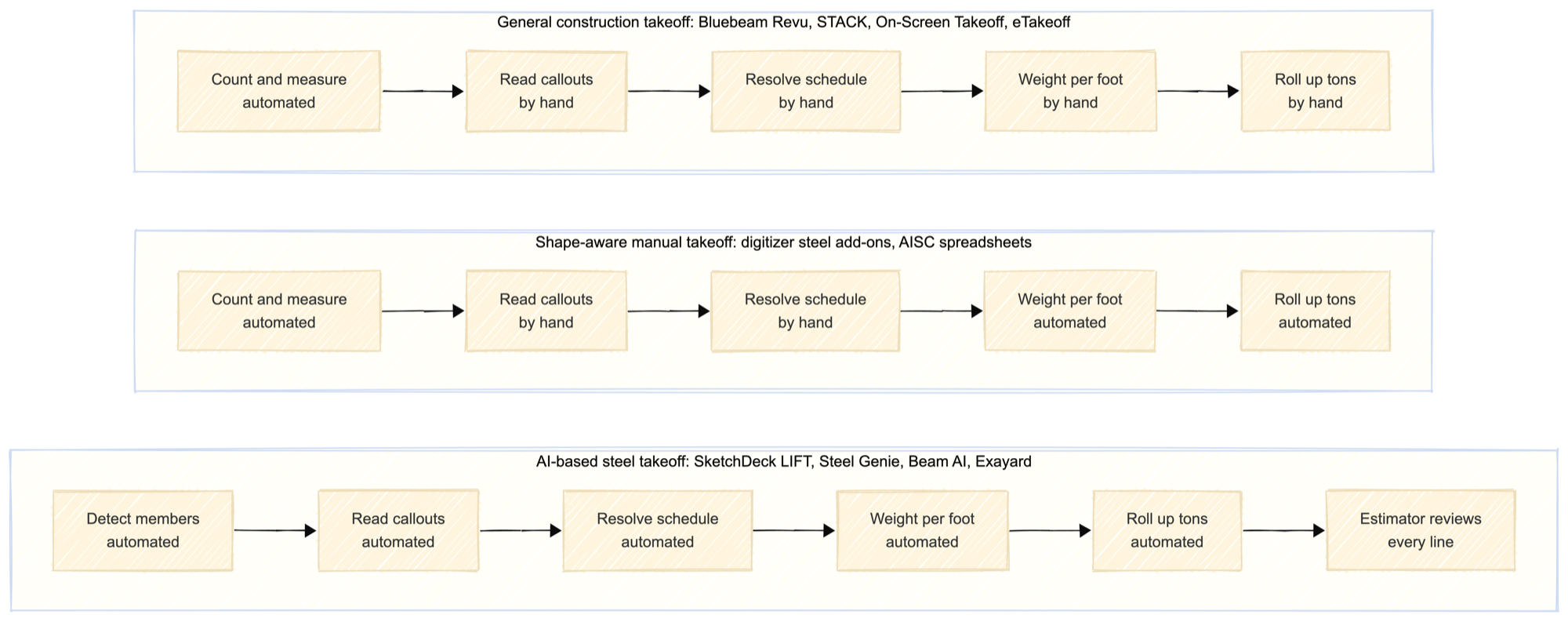
- Three categories of tool get called takeoff software. General construction takeoff (Bluebeam Revu, STACK, On-Screen Takeoff, eTakeoff), shape-aware manual takeoff (steel add-ons for digitizer tools, and spreadsheets built on the AISC table), and AI-based steel takeoff (SketchDeck LIFT, Steel Genie, Beam AI, Exayard).
- The time these tools save is on the counting, not the pricing. Material rates, shop hours, coatings, and margin still come from you.
- A takeoff is not an estimate. It is the count the estimate is built on. The line between them is in takeoff vs estimate.
- Sheet metal and plate nesting tools are a different category again, and they break on structural work for reasons covered in their own entry.
What does steel takeoff software actually do?
Work one framing plan and you can see exactly where each tool stops.
You open the sheet. You find every member on it: beams between grid lines, columns at the intersections, braces in the bays. You read the callout on each one, which gives you a shape and size for a beam but usually just a mark for a column. You go to the column schedule, often on a different sheet, and resolve that mark to a size at that tier. You look up the weight per foot for the shape. You multiply by length and quantity. You do it again on the next sheet, and you roll the whole thing up to tons.
General construction takeoff software automates the counting and the measuring. You still read every callout and look up every weight yourself.
Shape-aware manual takeoff, a digitizer with a steel add-on or a spreadsheet built on the AISC table, adds the shape library. Once you tell it a line is a W12x26, it knows the weight per foot and carries the tonnage for you. You still find and identify each member by hand.
AI-based steel takeoff tools attempt the finding and the reading too: detect the members on the plan, read the callout text, resolve the schedule reference, apply the shape table. The output is a draft takeoff for an estimator to review, not a finished one.
No tool in any of the three categories decides scope, writes exclusions, or prices anything.
How is it different from construction takeoff software?
| General construction takeoff | Shape-aware manual takeoff | AI-based steel takeoff | |
|---|---|---|---|
| What it measures | Lengths, areas, counts of any symbol | Steel members you identify | Steel members it detects |
| Unit of output | Linear feet, square feet, each | Pieces and pounds | Pieces and pounds |
| Knows steel shapes | No | Yes, from a shapes library | Yes, from a shapes library |
| Reads the column schedule | No | No, you key the sizes | Attempts it, estimator verifies |
| Produces tonnage | Only if you build the math yourself | Yes | Yes |
| Typical user | Any trade, one tool across a GC's bids | Steel estimator | Steel estimator |
| Named examples | Bluebeam Revu, STACK, On-Screen Takeoff, eTakeoff | Digitizer steel add-ons, AISC spreadsheets | SketchDeck LIFT, Steel Genie, Beam AI, Exayard |
The row that matters is the schedule row. On a steel set the size of a column is rarely written next to the column, and a tool that cannot follow a mark to another sheet leaves the slowest part of the job on the estimator's desk.
What is the best take-off software?
It depends on whether the quantities are already known or have to be derived. A job shop working from a purchase order and a part file already has its quantities, so the useful tool is a pricing and nesting tool rather than a takeoff tool; that case is its own entry. A structural fabricator bidding off a drawing set has no quantities at all, so the tool has to derive them, and a general measuring tool will get you counts but not tonnage.
As of September 2026, the products steel estimators most often name are Bluebeam Revu, STACK, On-Screen Takeoff, and eTakeoff. Bluebeam sells itself as PDF markup and measurement for construction. STACK and On-Screen Takeoff are takeoff platforms aimed at multiple trades. eTakeoff is a multi-trade digitizer with a steel add-on that supplies shapes. FastCAM comes up in the same searches, but its material-list tooling starts from typed quantities or CNC files rather than a drawing set, so it belongs with the job-shop tools above. None of them is ranked here. The tool-by-tool comparison lives in the best AI structural steel estimating software in 2026.
Is there a free takeoff software?
There is no complete free steel takeoff software, but there are free routes to a takeoff: a spreadsheet built on the AISC shapes table, and the count and measure tools in a free PDF reader. Time-limited trials of paid products exist, and a trial is not free software. The spreadsheet columns, the free PDF reader limits, and the point where free stops paying off are in is there free steel takeoff software. What the paid tools cost is in how is steel estimating software priced.
Is there any AI-based steel takeoff software available?
Yes. As of September 2026 several products use machine learning to detect steel members on framing plans and attempt the callouts and schedules, with the estimator verifying the result. Among them are SketchDeck LIFT, ALLPLAN's Steel Genie, Beam AI, and Exayard. Every one of them returns a takeoff for an estimator to check rather than a number to trust, and accuracy moves with drawing quality. The mechanism, the accuracy conditions, and what still needs a human are in is there AI-based steel takeoff software.
Example
A 400-sheet hospital set lands with two weeks on the clock. Call it 60 to 80 structural sheets inside it.
By hand, at close to an hour per structural sheet, the counting alone is eight to ten working days, which matches the one-to-three-week band a set that size usually runs. Bluebeam plus a spreadsheet changes the tallying, not the reading. The count tool gets you 60 beams on a plan in twenty minutes. Reading those 60 callouts and chasing their weights still takes the rest of the morning. An AI tool with the estimator reviewing every line puts the same large set at two to six hours.
The pricing work after the count is the same length in all three cases. That is the point: the takeoff is the half that software moves.
How Ferra handles this
Ferra sits in the third column of the table. It reads a full drawing set, detects beams, columns, and structural elements sheet by sheet, links plan views to elevations so column heights resolve without manual cross-referencing, and follows detail callouts to the detail. The estimator reviews every line and exports the takeoff with its quantities and tonnage. See Steel Takeoff, or the longer treatment of where an estimate's time goes in the honest guide to structural steel estimating. The tonnage math behind the roll-up is in how do you calculate steel tonnage from a takeoff.
Sources
- AISC Shapes Database v16.0, the weight per foot every tonnage roll-up is built on.
- Bluebeam product documentation and plan comparison, reviewed September 2026: Revu 21 on the Basics, Core, Complete, and Max subscription tiers.
- STACK and On-Screen Takeoff product documentation, reviewed September 2026: multi-trade construction takeoff and estimating platforms, as described by each vendor.
- eTakeoff and FastCAM product documentation, reviewed September 2026, for each vendor's own description of its takeoff and material-list capability.
- SketchDeck LIFT, ALLPLAN Steel Genie, Beam AI, and Exayard product documentation, reviewed August and September 2026, for each vendor's own description of automated steel takeoff.
- r/estimators, "Takeoff software (structural steel fabrication)", practitioner discussion of which tools steel fabricators use.