
No. There is no uncapped free steel takeoff software, but three free routes exist: a spreadsheet built on the AISC shapes table, the measuring tools in a free PDF reader, and free or trial accounts on paid products, capped by sheets or days. On a four-hundred-sheet set the counting is the cost, and free removes none of it.
Key facts
- Free steel takeoff software, in the sense of an uncapped product that reads a set and returns a member list, does not exist as of September 2026. What is free is the spreadsheet you build yourself, plus free accounts on paid products that stop at a sheet limit.
- A takeoff spreadsheet needs four columns to work: shape, quantity, length in decimal feet, and weight per foot. Everything else is a rollup.
- The AISC Shapes Database is free to download. That is where the weight per foot for HSS, pipe, angles, and plate comes from.
- Free PDF readers count and measure. They do not know that a W12x26 weighs 26 pounds per foot, and they do not read a column schedule on another sheet.
- Free accounts and trials exist on paid products, but they are capped by sheets or by days. A capped account is not free software, and a trial ends in the middle of a bid if you start it at the wrong time.
Is there a free takeoff software?
For general construction takeoff, partly. Some vendors offer a free entry tier or a capped version that measures areas, lengths, and counts, which is enough for drywall or sitework. For steel, no.
The tools estimators name most in general takeoff, Bluebeam Revu, STACK, On-Screen Takeoff, and eTakeoff, are commercial products. Free tiers and trial terms differ by vendor and change, so check the vendor's own page before you plan around one. None of them, free tier or paid, carries a shape table, resolves a column schedule, or rolls up tonnage. That gap is what steel takeoff software is for.
What does a free steel takeoff spreadsheet need?
Four columns and one formula. Shape, quantity, length in decimal feet, weight per foot. Then quantity × length × weight per foot gives pounds for that row, and the sum of the rows divided by 2,000 gives US tons. The full method, including which callouts carry the weight and which ones you have to look up, is in how to calculate steel tonnage from a takeoff.
Three columns are worth adding once the sheet grows. A sheet or level column, so the takeoff can be checked against the drawings one sheet at a time. A source column, so you can see whether a size came from a plan callout or from the column schedule. And a notes column for camber, studs, and the judgment calls you will be asked about at the bid review.
Keep lengths in decimal feet. Thirty feet six inches is 30.5, not 30.6. That one habit prevents more tonnage errors than any formula.
If you would rather not build it, download the Ferra structural steel takeoff sheet. It has the columns above and a weight per foot that fills itself from the shape designation or a lookup tab. Below the framing subtotal it has rows for connection material, base plates, anchor rods, and misc metals. It is free, carries no license, and ships with the same example job as the takeoff example entry.
Can you do a takeoff in a free PDF reader?
For counting and measuring, yes. Free readers let you place a count marker and measure a length once the sheet is calibrated to its scale. That covers the mechanical half of the work.
For everything after that, no. The reader does not know what a W12x26 is, so it cannot apply 26 pounds per foot. It cannot follow a callout to a column schedule two sheets away. It cannot tell you that a member changed in addendum two. You end up typing counts into a spreadsheet by hand, which is the workflow most estimators already run in a paid markup tool. See can you do a steel takeoff in Bluebeam.
| Spreadsheet on the AISC table | Free PDF reader | Reader plus spreadsheet | Steel takeoff software | |
|---|---|---|---|---|
| Counts members | You count | Yes, by hand | Yes, by hand | Detected for review |
| Measures length | You type it | Yes, if calibrated | Yes | Read from the drawing |
| Knows shape weights | Yes, if you look them up | No | Yes, by lookup | Yes, from the shape table |
| Reads a column schedule | No | No | No | Yes |
| Rolls up tonnage | Yes | No | Yes | Yes |
| Handles a revision | You redo the affected rows | No | You redo the affected rows | Compared against the earlier set |
| Cost | Free | Free | Free | Paid |
How much does takeoff software cost?
Almost no vendor in this category publishes a list price. The quotes you will get are built three ways: per seat, per project or per sheet, and a flat subscription. A fabrication management module is a fourth route for shops already buying one. Which model you are quoted matters more than the headline number, because per-seat pricing punishes a shop with several estimators and per-takeoff pricing punishes a shop that bids a lot and wins a little. The models, the caps hidden inside them, and the six questions that make two quotes comparable are in how steel estimating software is priced.
Where free stops paying off
The free route has a cost. It is the estimator's time, and it does not appear on any invoice, so it is easy to leave out of the comparison.
Put a number on it. Assume a loaded hourly rate of $75, wage plus burden for an estimator. That is an assumption, not a published figure. Use your own number if you have it from job costing. A structural sheet takes close to an hour to work through by hand, by one software vendor's own published figure, which matches what estimators report for a full takeoff.
A mid-size commercial job, 35 structural sheets:
35 sheets × 1 hour per sheet = 35 hours. 35 × $75 = $2,625 of estimator time per bid. That is the four to five days a mid-size takeoff runs by hand.
A large hospital set, 400 sheets total, roughly 80 of them structural:
80 sheets × 1 hour per sheet = 80 hours. 80 × $75 = $6,000 of estimator time per bid, about ten working days.
One estimator running 40 mid-size sets a year:
35 hours × 40 bids = 1,400 hours. 1,400 × $75 = $105,000 a year in counting.
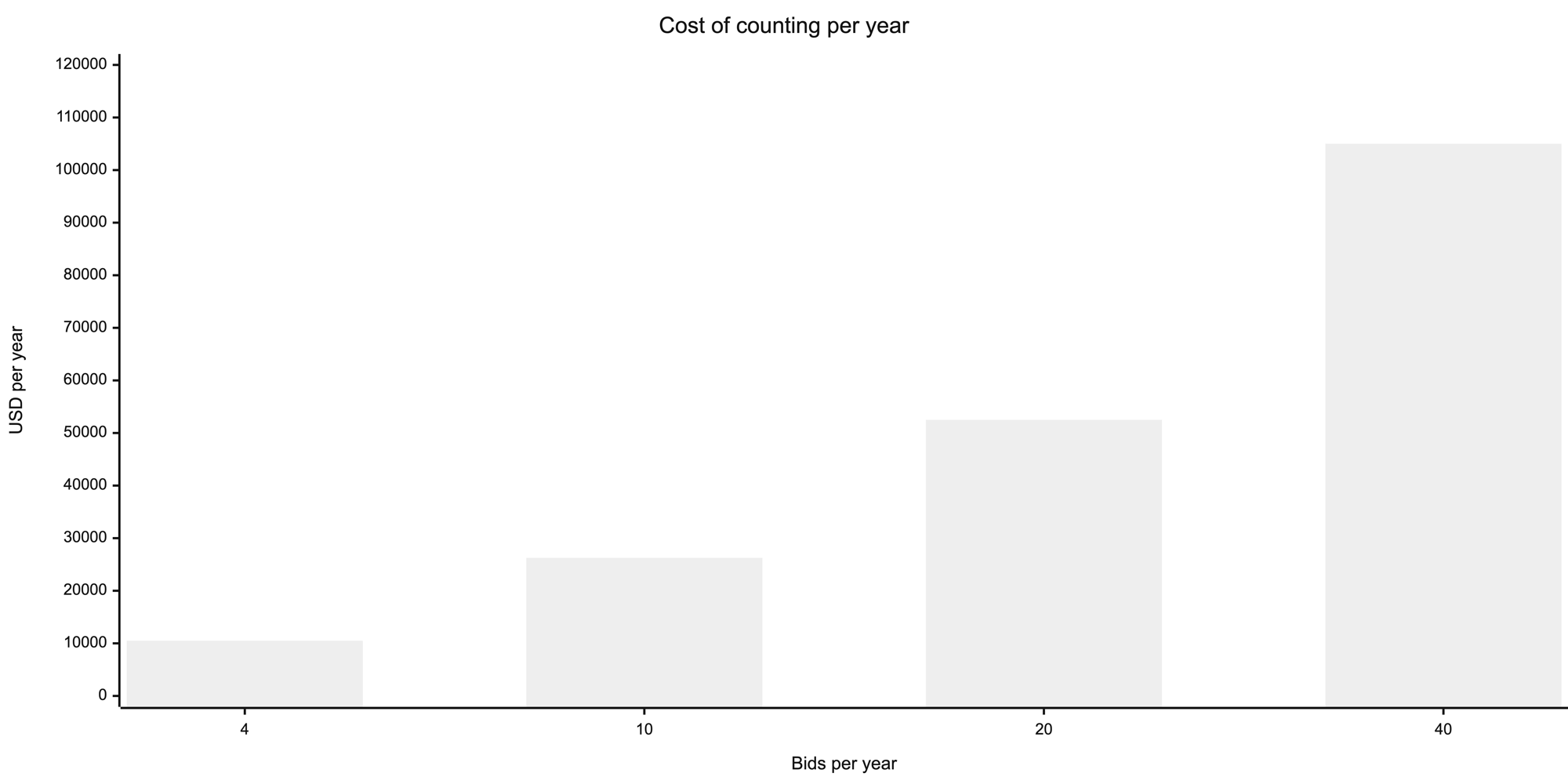
That last line is the one to hold any quote against. Not the monthly price, and not the price per seat. Total cost per bid, counting the hours the free route spends, against total cost per bid with the software in it. A shop that bids four sets a year will not beat the spreadsheet. A shop that bids forty usually does, and the margin is not close.
Two costs do not show up in the arithmetic at all. The bids you did not submit because the estimator was still counting. And the revision you missed, which is a lost job or a bad one.
Example
A 40-sheet mezzanine package. Six framing sheets, one column schedule, no braces worth arguing about. A spreadsheet handles it. The estimator counts, types, and checks the totals in a day, and the sheet is quick to re-check at bid review. Buying software for this job would be hard to justify.
A 400-sheet hospital set, two weeks to bid. The spreadsheet still works. The math does not care how big the job is.
The counting is what breaks. About ten working days of finding members, reading callouts, and chasing sizes into the column schedule, on a set that is due in ten. Then addendum three lands on day eight and every affected row has to be found again. Nothing in the spreadsheet is wrong. There is just not enough of the estimator to go around.
How Ferra handles this
Ferra detects columns, beams, joists, and braces, applies the AISC weight per foot, and returns a takeoff with tonnage for the estimator to review and export. It has a free self-serve account that runs a set up to a sheet cap with no demo call. Past the cap it is a paid product, priced by the shop rather than by the seat, so compare on total cost per bid using the arithmetic above with your own loaded rate. See Steel Takeoff.
Sources
- AISC Shapes Database v16.0, free to download, the weight per foot behind every spreadsheet column described here.
- ALLPLAN, published product material for Steel Genie, on manual processing time per structural sheet, the one-hour-per-sheet figure used in the arithmetic.
- How long does a structural steel takeoff take, the source of the four-to-five-day and ten-day figures, so both pages agree.
- Vendor trial and free-tier terms, as published by each vendor, reviewed September 2026.