
Yes, with limits. A Bluebeam steel takeoff means counting members and measuring lengths on the PDF with Revu's count and measurement tools, then exporting the markups list to a spreadsheet for weights. Revu does not know steel shapes, read a column schedule, or total tonnage, so the spreadsheet does the steel part.
Key facts
- A Bluebeam steel takeoff is a markup job: count markups for pieces, measurement markups for lengths, the Markups list as the tally, and a CSV summary out to a spreadsheet.
- Revu is good at the part it was built for. Counting symbols, measuring calibrated lengths, and showing what changed between two issues of a sheet are all first-class features.
- It has no steel shape catalog. Revu does not know that W12x26 weighs 26 pounds per foot, and nothing in the product will tell you.
- It does not read a callout or resolve a column schedule. Every size in the takeoff is a size an estimator read and typed.
- The common setup is Bluebeam plus a spreadsheet. Revu produces quantities and lengths; the spreadsheet holds the shapes, the weights per foot, and the tonnage roll-up.
- Tool names described here are from Revu 21 on the current subscription tiers, Basics, Core, Complete, and Max, as of September 2026. Max, added in May 2026, layers AI drawing review on top of Complete.
How do estimators set up Bluebeam for steel?
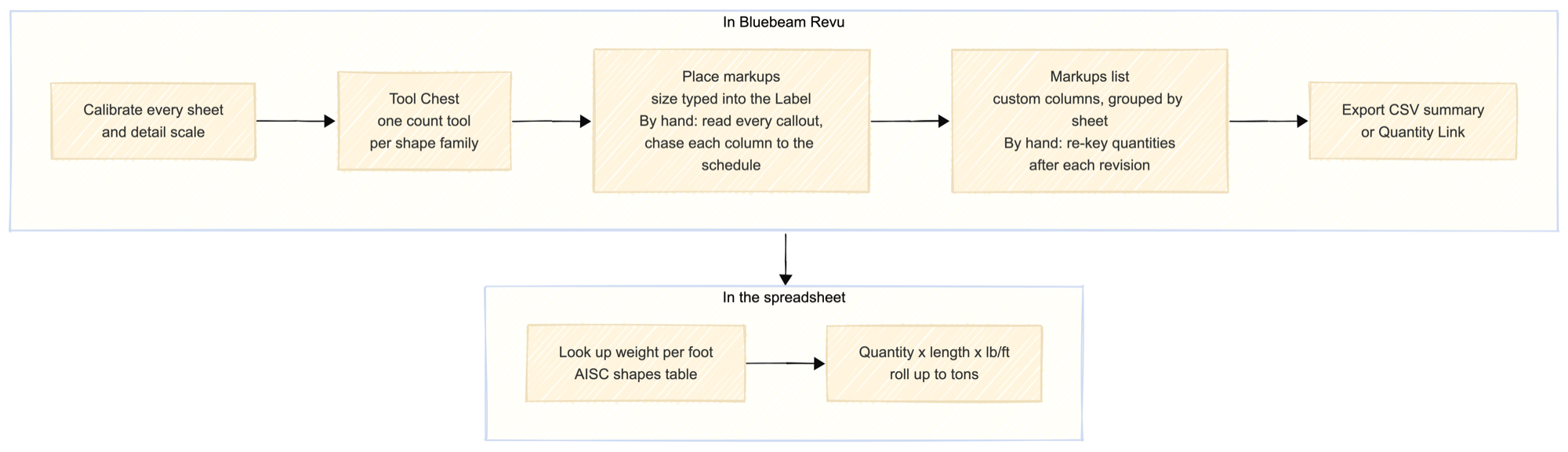
Start with scale. Calibrate every sheet before you measure anything, and calibrate again for any detail or enlarged plan drawn at a different scale on the same page. A length measurement on an uncalibrated sheet is a number with no unit behind it, and it will look exactly as convincing as a correct one. If the set is a mix of full-size and half-size sheets, calibration is where the morning goes.
Then build the Tool Chest once and reuse it on every job. Make one count tool per shape family rather than one per size: W-shapes, HSS, channels, angles, joists, and a catch-all for misc. Give each its own color and symbol so the sheet reads at a glance, and save them as a custom tool set so the next job starts from the same legend.
In the markup properties, use the Subject field for the shape family and the Label or comment for the actual size, because those fields are what come out in the export. Placing a count markup and typing "W16x31" into its label is the single habit that makes the spreadsheet step bearable later. For repeated identical symbols, VisualSearch will find matches across the sheet and turn them into count markups in one pass. It works well on clean vector PDFs and poorly on scans, and it does not distinguish a W16x31 from a W16x26, so it counts pieces, not sizes.
Set up the Markups list before you start, not after. Add custom columns for shape, size, length, and weight per foot, and keep them as the columns you fill in; a column you leave blank on sheet one will be blank on sheet forty. Group the list by Subject or by page so each sheet subtotals on its own. When the sheet is done, export the Markups list as a CSV summary and paste it into the takeoff spreadsheet, where a lookup against the AISC shapes table turns size and length into pounds. Quantity Link can hold that connection live to an Excel file instead of a manual paste, which is worth setting up if you re-export after every addendum.
Two more habits pay off. Load the drawings as a Set rather than as loose PDFs, so sheet navigation and page labels survive. Drop a legend on each sheet so the person checking your work can see what each color means without asking.
What Bluebeam can't do on a steel set
The column schedule is the clearest limit. Count markers on a framing plan tell you there are sixteen columns at level 2; the size of each one is on a different sheet, in a table keyed by grid intersection or by mark. Revu will happily count the columns and will not connect a single one of them to its section. That lookup is manual, it is the slow part of column takeoff, and it is where transcription errors enter the takeoff quietly.
Callouts are the second limit. A beam callout is compressed notation, and the parenthetical matters. W18x35 (26) carries 26 shear studs. A camber note or a UNO general note somewhere on sheet three changes what the callout means across an entire floor. Revu renders the text. It does not parse it, so nothing in the markup knows about the studs unless the estimator typed them into a column.
Revisions are the interesting case, because Bluebeam is genuinely strong here and still stops short. Compare Documents and Overlay Pages will show you, in color, exactly what moved between revision B and revision C of a sheet. What neither will tell you is what that change did to the count. A cloud on one bay could be a note edit or eight hundred pounds of steel, and working that out means re-reading the affected markups by hand. The method for turning a graphical diff into a priced change list is in how do you compare two drawing revisions.
Bluebeam versus steel takeoff software
| Bluebeam alone | Bluebeam plus spreadsheet | AI-based steel takeoff software | |
|---|---|---|---|
| Counts members | Yes. Count tool and VisualSearch, placed by the estimator | Yes, same markups | Yes, detected from the drawing and reviewed by the estimator |
| Measures length | Yes, accurately, once the sheet is calibrated | Yes, same measurements | Yes, from the detected geometry, still worth spot-checking |
| Knows shapes | No shape catalog | Only what you build into the lookup table | Yes, an AISC shape catalog behind every line |
| Reads schedules | No | No. Sizes are transcribed by hand | Attempts it, for the estimator to verify |
| Computes tonnage | No | Yes, by formula in the sheet | Yes, rolled up automatically |
| Handles revisions | Shows the graphical difference between sheets | Shows the difference; quantity delta is re-keyed | Member-by-member change list against the takeoff |
| Exports to estimate | Yes. CSV or PDF summary of the Markups list | Yes, plus whatever the spreadsheet feeds | Yes. CSV and estimating or fabrication system formats |
Read the table honestly and Bluebeam wins the top two rows outright and half of the revisions row. Where it loses is everything downstream of the count: the shapes, the schedule, and the arithmetic that turns pieces into tons. That is also the argument for keeping it. A shop that already owns Revu and uses it for RFIs, submittals, and sheet comparison does not need to stop; the question is only whether the spreadsheet half is worth what it costs in hours. For the version of that argument with no software in it at all, see is there free steel takeoff software. For the categories of tool that sit above this one, see what is steel takeoff software.
Example
One level of a framing plan, about 60 beams. With a calibrated sheet and a tool set already built, the counting itself is quick. Count markups on all 60 take roughly twenty minutes, and the lengths come with them if the members are measured rather than counted.
The rest of the morning is the other half. Sixty callouts have to be read and typed in, including the ones printed over a grid line or a dimension string. Every column on the same sheet has to be chased to the column schedule. Then the sizes are matched against the AISC table for weight per foot before the spreadsheet can total anything (the tonnage math itself is one multiplication per line). The count was twenty minutes. The takeoff was a morning, and none of the slow part was Bluebeam's fault.
How Ferra handles this
Ferra takes the same PDF set and returns the half Revu leaves to the spreadsheet. It detects beams and columns across every sheet, reads sizes from callouts and the column schedule, matches shapes to a catalog, and rolls up tonnage for the estimator to review rather than build. It works best on native-vector PDFs; scanned sheets are flagged before processing because detection accuracy drops on them. Markups made in Ferra export to a PDF overlay, a Bluebeam BAX file, or CSV. See Steel Takeoff.
Sources
- Bluebeam Revu documentation and help center, for the count, measurement, Tool Chest, Markups list and summary export, VisualSearch, Quantity Link, Sets, Compare Documents, and Overlay Pages features, and for the Basics, Core, Complete, and Max tier split. Reviewed against Revu 21 and Bluebeam's published plan comparison, September 2026. Tool names shift between releases; check the current release notes before following the setup steps verbatim.
- AISC Shapes Database, for weight per foot. This is the table a Bluebeam-plus-spreadsheet workflow has to supply itself, because Revu has no shape catalog.
- AISC 303, Code of Standard Practice for Steel Buildings and Bridges, for what design documents are required to state, which is why a missing or incomplete column schedule becomes a bid qualification rather than a guess.