
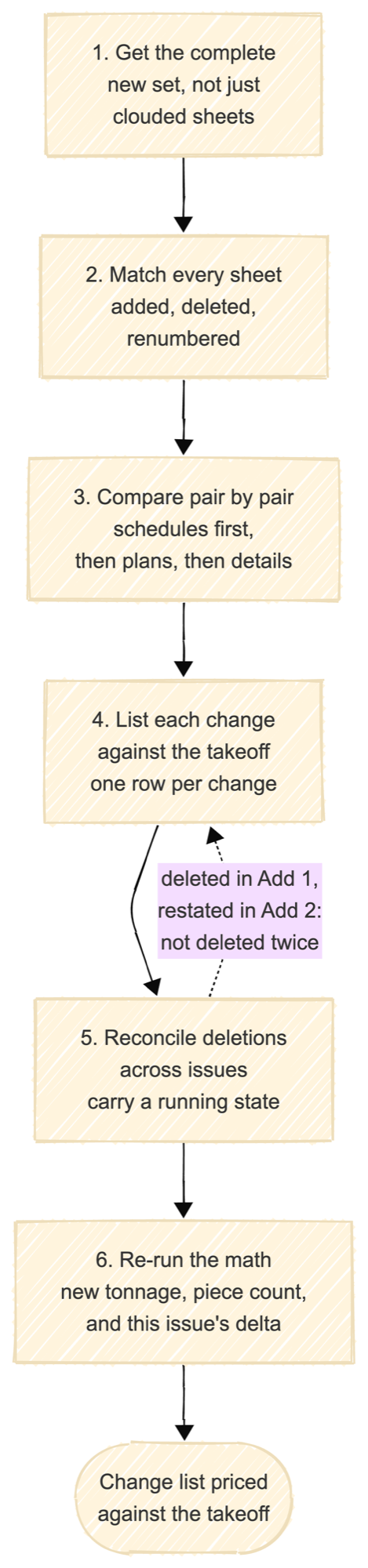
Compare full sets, not clouded sheets: match every sheet between issues, compare pair by pair starting with the schedules, list each change against the takeoff, reconcile deletions across addenda so nothing is counted twice, then re-run tonnage and record the delta. Revision clouds are a starting checklist, never the change list.
Key facts
- Never trust the revision clouds alone. Clouds mark what the drafter remembered to cloud, and the changes that cost money are the ones nobody clouded.
- Compare full sets, not just the sheets the narrative mentions. Changes ripple: a column size change on the schedule touches framing plans that were never re-issued.
- Work from a matched sheet list. Sheets get added, dropped, and renumbered between issues, and a comparison against the wrong sheet finds nothing.
- Track deletions as carefully as additions, and only count each one once across addenda. Deleting the same beam twice is the classic tonnage error.
- The output is a change list priced against the takeoff, not a stack of marked-up sheets.
Steps
- Get the complete new set. Not the clouded sheets, the whole issue. Ask for the drawing log if one exists, and confirm which addendum or bulletin this issue belongs to.
- Match the sheets. Pair every sheet in the new set with its counterpart in the old one. Note added sheets, deleted sheets, and renumbered sheets before comparing anything.
- Compare pair by pair. Overlay or side-by-side, whichever your tool gives you. A Bluebeam or viewer overlay shows the pixel difference on one sheet; the method is what you do with it. Read the schedules first, then framing plans, then details. Schedule changes fan out the furthest.
- List every change against the takeoff. Member added, member deleted, size changed, length changed, connection note changed, studs or camber changed. One row per change, tied to the takeoff line it touches.
- Reconcile deletions across issues. A member deleted in the previous addendum and restated in this one is not deleted again. Carry a running state, not a per-issue diff.
- Re-run the math and record the delta. New tonnage, new piece count, and what this issue alone changed, so the bid acknowledgment and any change order can cite it.
Where does manual comparison break?
Three places. Mechanics first: overlays only work on aligned sheets at the same scale, and a scanned or rotated set breaks them, which is why field comparisons quietly fall back to eyeballing. Then scale: a typical addendum costs about a day of this work, and a re-issued full set with a few hundred changes runs into days on its own. And attention: the misses cluster in exactly the places that cost money: the unclouded schedule cell, the connection note on a detail sheet, the stud count that moved by ten. The estimators we talk to describe losing a day per addendum to this, and the failure is silent. Nothing tells you about the change you did not find.
Example
Sheet S3.1 goes from revision B to C in addendum 2. The overlay shows a cloud on one bay. The comparison against the takeoff shows three things: the W16x26 at grid D becomes a W16x31, its stud count moves from 18 to 26, and beam B-7, deleted in addendum 1, reappears on the re-issued sheet because the drafter restated the plan from an older file. Rows one and two change the takeoff. Row three changes nothing, because the running state says B-7 is already gone, and the drafting error gets a bidder question instead of eight hundred pounds of phantom steel.
How Ferra handles this
Ferra compares the two sets member by member, surfaces every candidate change for the estimator to confirm or reject, and keeps the running state across issues so nothing is double-counted. The convention on screen is simple: red is dead, blue is new. See Revision Control.
Sources
- AISC 303, Code of Standard Practice for Steel Buildings and Bridges, for the requirement that revisions to released documents be identified. The procedure itself is estimating practice, not a code requirement.
- Method as practiced by the estimators we talk to; time figures stated without customer attribution.