
Yes. AI steel takeoff software uses machine learning to detect steel members on framing plans and read the callouts, schedules, and details around them, returning a draft takeoff instead of a blank sheet. Ferra, SketchDeck LIFT, Steel Genie, Beam AI, and Exayard are examples as of September 2026. Accuracy tracks drawing quality, and every output needs an estimator's review.
Key facts
- "AI" in AI steel takeoff software means detection. A model looks at the drawing image, finds the things that are members, and reads the text attached to them. It is not a chatbot, and it does not need a native CAD or BIM file to work.
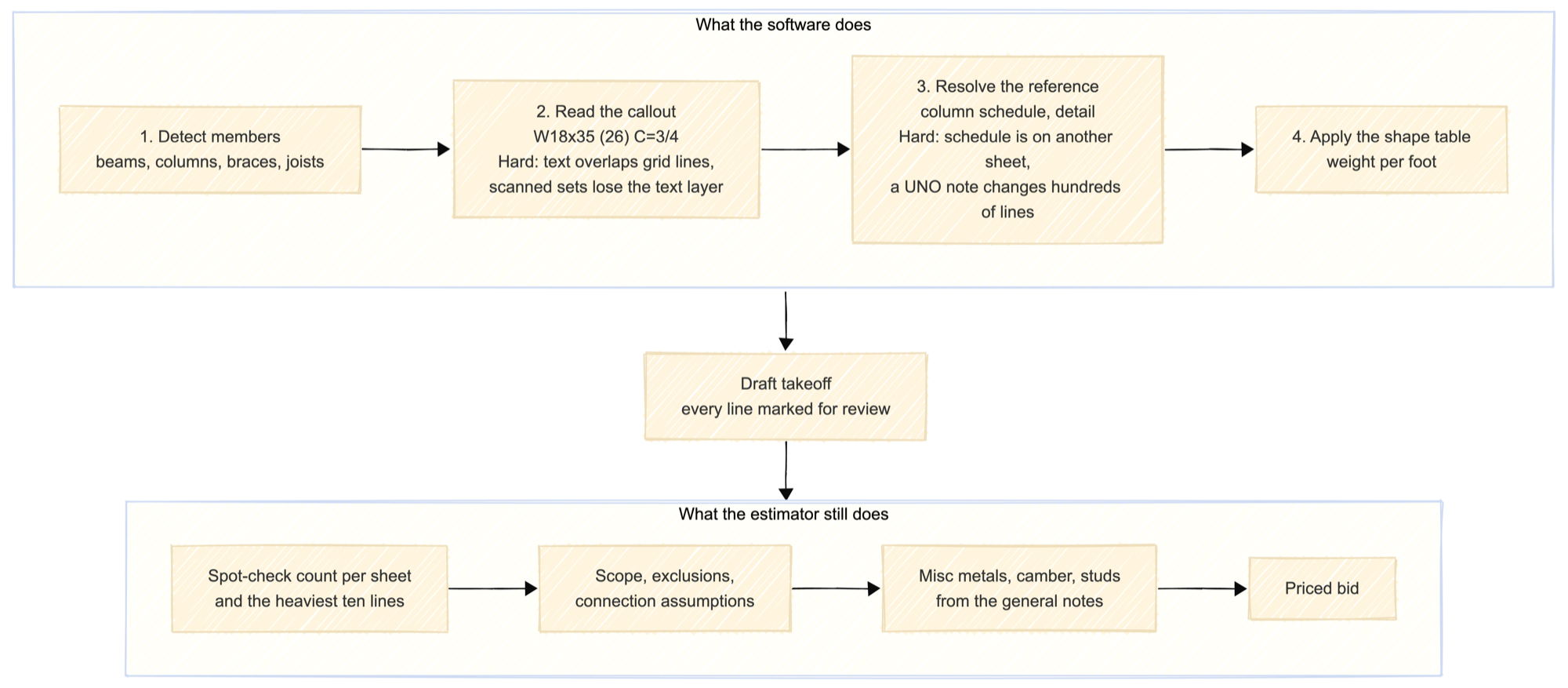
- It automates four steps an estimator does by eye: finding members on a plan, reading the callout, chasing the reference to the column schedule or a detail, and applying the weight per foot.
- It does not automate the judgment: what is in scope, what gets excluded, what connection to assume, what the steel is worth.
- As of September 2026, products that describe themselves this way include SketchDeck LIFT, ALLPLAN's Steel Genie, Beam AI, and Exayard. Several general construction takeoff tools have added detection features to an existing product rather than shipping a steel-specific one.
- The output is a draft, not an answer. Every one of these products returns a takeoff for an estimator to review, and all of them say so.
Is there any AI-based steel takeoff software available?
Yes, and more than one. The category is young: it exists because drawing sets arrive as PDFs and detection got good enough to read them. Below is what each vendor says its product does, as of September 2026. This is not a ranking, and none of these descriptions are accuracy claims.
| Product (as of September 2026) | What the vendor describes | Input and output |
|---|---|---|
| SketchDeck LIFT | AI takeoff for structural steel: beams, columns, braces, and joists, with size, stud count, and camber read from the labels. A separate product, LIFT-Delta, compares revisions member by member and shipped in April 2026 | PDF drawing sets in; exports to Tekla, STRUMIS, FabTrol, and Excel |
| Steel Genie (ALLPLAN) | Detects beams, columns, braces, and joists with size, length, and weight, reads moment connections, camber, and shear studs, and builds an estimating-level 3D model and bill of materials. Launched April 2026 | PDF drawing sets in; exports to Excel, marked-up PDF, IFC, and Tekla PowerFab |
| Beam AI | Multi-trade AI takeoff covering more than fifteen trades, structural steel among them, sold as self-serve AI or as a done-for-you takeoff with human checking | Drawing sets in |
| Exayard | Multi-trade count-and-measure takeoff tool with a structural steel page | Drawing sets in |
| Ferra | Steel-only AI takeoff: detects beams, columns, joists, and braces across the full set, reads column properties from the schedule, compares revisions side by side, and returns a takeoff for estimator review | PDF drawing sets in; exports to Tekla PowerFab, IFC, CSV, PDF, and Bluebeam markups |
For what the broader category covers, including the non-AI tools estimators already own, see what is steel takeoff software.
What does the AI actually do to a drawing?
Four steps, in order.
One, detect the members. On a framing plan, a beam is a line with a particular weight and a particular relationship to the grid. Detection finds those lines and classifies them: beam, column, joist, brace. This is the step that works best, because framing plans are drawn to a convention and the convention holds across most sets.
Two, read the text. Every detected member needs its callout. W18x35 (26) has to come off the sheet as characters, then be parsed into a shape, a size, and a stud count. This is where clean sets and scanned sets part company.
Three, resolve the reference. A callout often does not carry the size. Columns are marked C1 and sized on a schedule two sheets away. A beam may point at a detail that sets the camber. The software has to follow that pointer to another sheet and bring the answer back to the member.
Four, apply the shape table. Once a member has a shape and a length, weight per foot comes from the AISC shapes table and the line multiplies out. This step is arithmetic and it is never the problem.
Steps two and three are the hard ones. Callout text overlaps grid lines and dimension strings. Schedules live on their own sheets and come in two different formats. A general note that says "all beams cambered UNO" changes hundreds of lines and appears once, in small type, on a sheet nobody detects members on. Early sets make all of this worse: at 30 or 60 percent the reference the software is chasing may not have been drawn yet.
How accurate is AI takeoff?
There is no vendor-independent benchmark, so treat any single percentage as a claim about one product on one kind of set. Two conditions move the number more than anything else.
Set quality. A vector PDF exported straight from the design model has real text and clean geometry, and detection reads it well. A scanned set, a photographed set, or a PDF that has been printed and re-scanned loses the text layer, and every callout becomes a character-recognition problem. The gap between those two cases is larger than the gap between products.
Whether the reference sheets are there. A set with a complete column schedule gives the software something to resolve against. A set without one leaves the same hole it leaves for a human, and nothing fills it automatically.
The one figure published in this knowledge base is that detection on a good set runs in the mid nineties out of the box, before review, measured on framing members. That number, and the review time behind it, is in how long does a structural steel takeoff take.
What an estimator checks first, on any product:
- Member count per sheet against a spot count of two or three sheets you pick yourself, including one busy sheet.
- The heaviest ten lines by total weight. An error there is worth more than every light-gauge line combined.
- Every column stack against the schedule, tier by tier.
- The general notes, for the UNO that changes a whole category.
What still needs a human?
The parts that are not on the framing plan, and the parts that are not questions of fact.
- Scope. What is in the steel package and what belongs to another trade. The drawings do not say; the spec and the bid form do.
- Exclusions and qualifications. Naming the missing schedule, the unsized members, the assumption you priced.
- Connection assumptions. Shear versus moment, bolted versus welded, and what that does to shop hours.
- Miscellaneous metals. Stairs, rails, ladders, embeds. Mostly drawn late, in details, or not at all.
- Camber, studs, copes, and finish. Detected when the callout says so, missed when a note two sheets away says so.
- Revisions. The comparison can be automated; deciding what a change costs cannot. See how do you compare two drawing revisions.
Example
One line on a framing plan reads:
W18x35 (26) C=3/4"
A detection pass returns the member, the shape, and the length it measured from the grid. What it does with the rest of the callout is the whole question.
| Field | What the takeoff comes back with | What the estimator does on review |
|---|---|---|
| Shape and size | W18x35 | Confirms against the plan |
| Length | 30 ft, measured grid to grid | Checks it is centerline, not clear span |
| Weight per foot | 35 lb/ft from the shape table | Nothing; this is arithmetic |
| Studs | 26, read from the parenthetical | Confirms the count, and checks the general notes for a stud spec that overrides it. See shear studs |
| Camber | 3/4 in, read from the callout | Checks whether the notes camber all beams over a span, which would add camber to lines whose callouts never mention it |
| Connection | Not returned | Assumes it, from the detail and the end reaction |
The first three rows are the ones the software removes from the estimator's day. The last three are the ones the estimator still owns, and they are where the money is.
How Ferra handles this
Ferra reads the drawing set as a PDF and detects beams, columns, joists, and braces across every sheet rather than sampled ones. It links the plan view to the elevation so a column's height and stacking resolve without cross-referencing by hand, and follows detail references from the member that carries them. The result is a takeoff the estimator reviews and exports, not a number to take on faith. The review step is part of the product. See Steel Takeoff, and for where the rest of a steel estimate's time goes, the honest guide to structural steel estimating.
Sources
- AISC Shapes Database, for weight per foot per shape, the table every product in this category applies at the last step.
- AISC 303, Code of Standard Practice for Steel Buildings and Bridges, for the expectation that design documents be complete enough to fabricate from, which is what a missing column schedule fails.
- Vendor product documentation for SketchDeck LIFT, ALLPLAN Steel Genie, Beam AI, and Exayard, reviewed August and September 2026, cited by name.
- How long does a structural steel takeoff take, for the detection and review figures quoted above, which are ranges reported by fabricators in 2026 and sourced in that entry.