The best AI structural steel estimating software in 2026 (an honest comparison)

Most "AI estimating" tools either do beams well and columns poorly, or aren't built for steel at all. This is a straight comparison of the real options in 2026: SketchDeck, Steel Genie, Beam AI, the Bluebeam and Tekla status quo, and Ferra.
Full disclosure before anything else: we build Ferra, one of the tools in this comparison. We've tried to be straight about where each option is strong, where it's weak, and who it actually fits, including ourselves. If you only want our pitch, book a demo. If you want the honest lay of the land first, keep reading.
Here's the problem every steel estimator runs into right now. Every tool says it does AI structural steel takeoff. Every demo looks clean. Then you run a trial and find out the columns don't detect, or the revision tool double-counts, or the whole thing was really built for general contractors and pointed at steel as an afterthought. Plenty of AI construction estimating software is genuinely good, just not for structural steel. So this is the comparison we wished existed when we started.
One category note before the tools. A lot of what gets sold as "fabrication estimating software" prices sheet and plate parts by cut length and nest yield, which is a completely different job from pricing a steel package. If you are not sure which kind you are looking at, we pulled that distinction apart in why sheet metal tools break on structural steel.
How we compared them
We weighed each tool on what actually matters for a structural steel estimating workflow:
- Built for steel, or for everyone? Steel is niche. Tools built for general contractors rarely handle it well.
- Beams and columns. Beams are easy. Columns, especially without a column schedule, are where tools fall apart.
- Scope beyond main members. Joists, braces, connections, and misc steel, not just beams and columns.
- Revisions. Can it compare two sets and report what changed without double-counting beams?
- Pricing model. Seat-based, per-takeoff, or flat.
- Support and roadmap. In a fast-moving space, how quickly the team ships matters as much as today's feature set.
SketchDeck
The first mover and the most established name in AI steel takeoff software. If you want the vendor that has been at it longest and has processed the most drawing sets, this is it. Beam takeoff is solid, it publishes support for columns and braces along with connection analysis, and it exports into Tekla and the common fab-management platforms. It launched revision management, LIFT-Delta, in April 2026.
Where estimators push back: column detection comes up as inconsistent, which matters because columns are the hard part. One described the trial this way, and it stuck with us: every vendor says "we do columns, we do columns, we do columns," and then you run it on a real set and it turns out to be "yeah, we do columns, kinda." Its seat-based pricing has also drawn pushback from smaller shops. The useful question is not whether a capability appears on a feature list, it is how it performs on your drawings, particularly incomplete schedules and multi-version sets. Trial it on one of your own jobs.
Best for: shops that want the longest track record in the category and will test it hard on their own sets.
Steel Genie
Launched April 2026 from ALLPLAN, the Nemetschek company that also owns SDS2 and Bluebeam. Its strength is the tie-in to SDS2 for downstream detailing, so if your shop already lives in that ecosystem, the handoff is clean. Per its published materials it detects beams, columns, joists, and braces, picks up camber and shear studs, calculates simple connections to AISC standards for estimating purposes, and builds an estimating-level 3D model. Exports go to Excel, marked-up PDFs, IFC, and Tekla PowerFab. To its credit, the estimator reviews detected members before export, and it says plainly that accuracy depends on drawing quality.
The gap worth knowing: as of this writing its published materials do not mention revision or addendum comparison. If revisions are where your days go, ask that first in the demo. It is also only months old, so there is little independent track record yet.
Best for: shops already committed to SDS2 and the ALLPLAN ecosystem.
Beam AI
Broad, well funded, and genuinely capable, with a large user base across 15-plus trades. It now offers two ways to work: done-for-you takeoffs with human QA delivered on a turnaround, and a newer self-serve workflow where you run the takeoff yourself.
The trade-off is depth versus breadth. Beam spans many trades; a steel-native tool spends all of its attention on columns, connections, and the framing conditions specific to steel. Which matters more depends on how much of your work is steel and how much is everything else.
Best for: general contractors and multi-trade contractors who want flexibility between delivered and self-serve takeoffs.
The incumbent stack (Bluebeam, Tekla, and fab-management software)
Not AI estimating tools, but the reality of how most shops still work, and the baseline every AI tool on this list has to beat. If you are shopping, this is what you are leaving rather than what you are choosing between. Bluebeam is the trusted standard for markup and manual takeoff. Tekla covers detailing and fabrication management. Alongside them sit the established fab-management platforms with estimating modules built in: Tekla PowerFab (the former FabSuite), STRUMIS, and SDS2. All are deep, proven, and widely used, and we compared PowerFab and STRUMIS in their own article, because choosing a shop system is a different decision from choosing a takeoff tool.
Two limits. None of these is AI-native, so the takeoff itself is still manual counting, which is the time sink this whole category exists to fix. And the estimating modules start from quantities you already have, whether typed in, imported from a detailing model, or counted by hand. None of them reads the PDF set.
Best for: shops not ready to change their workflow yet.
Ferra

Our tool, so weigh this accordingly.
Ferra is built only for structural steel. It detects beams, columns, joists, and braces across a full drawing set. It reads column properties off the schedule, including sections that change by height and footing depth below grade. It assigns connection types across a set with a bulk editor, and picks up the shear, moment, and axial design forces the engineer specified on the drawings. It compares revisions side by side, with the estimator confirming each change, so nothing gets double-counted into tonnage. Bid intelligence gives you a go or no-go read on a set before you commit estimator hours to it. It builds a 3D model from the 2D drawings, and exports to Tekla PowerFab, IFC, CSV, and Bluebeam markups.
Pricing is revenue-based with unlimited users and projects. You can create an account and run your own drawings without booking a call first.
Where the limits are, stated plainly. We do not design connections or calculate reactions, because that is engineering and it carries somebody's stamp. Miscellaneous metals are in progress, with a beta targeted for Q4. Costing and pricing still happen in your spreadsheet or your fab-management system rather than in Ferra. And the estimator reviews every number, which is a design decision rather than a gap we are closing.
Best for: structural steel fabricators and erectors who want a steel-native AI tool that handles columns, connections, and revisions with the estimator in control.
At a glance
| Tool | Built for | Detection scope | Revisions | Pricing model | Best for |
|---|---|---|---|---|---|
| SketchDeck | structural steel | beams strong, columns reported inconsistent, braces, connection analysis | LIFT-Delta revision management | seat-based | shops wanting the longest track record |
| Steel Genie | structural steel | beams, columns, joists, braces, estimating-only connections | none published | enterprise / ecosystem | shops deep in SDS2 / ALLPLAN |
| Beam AI | 15+ trades | steel as one of many | tracked in the service | per-takeoff / subscription | GCs wanting delivered or self-serve |
| General AI takeoff (Kreo, STACK, Togal AI) | all trades | steel as one of many | varies | per-seat / subscription | multi-trade contractors |
| Digital takeoff (eTakeoff, FastCAM) | all construction, steel module | manual, not AI | manual | license / seat | shops wanting proven manual takeoff |
| Incumbents (Bluebeam, Tekla PowerFab, STRUMIS, SDS2) | all construction | manual, not AI | manual | license | shops not ready to change workflow |
| Ferra | structural steel only | beams, columns, joists, braces, connection types and design forces | side-by-side diff, estimator confirms each change | revenue-based, unlimited users | steel fabricators wanting a steel-native AI tool |
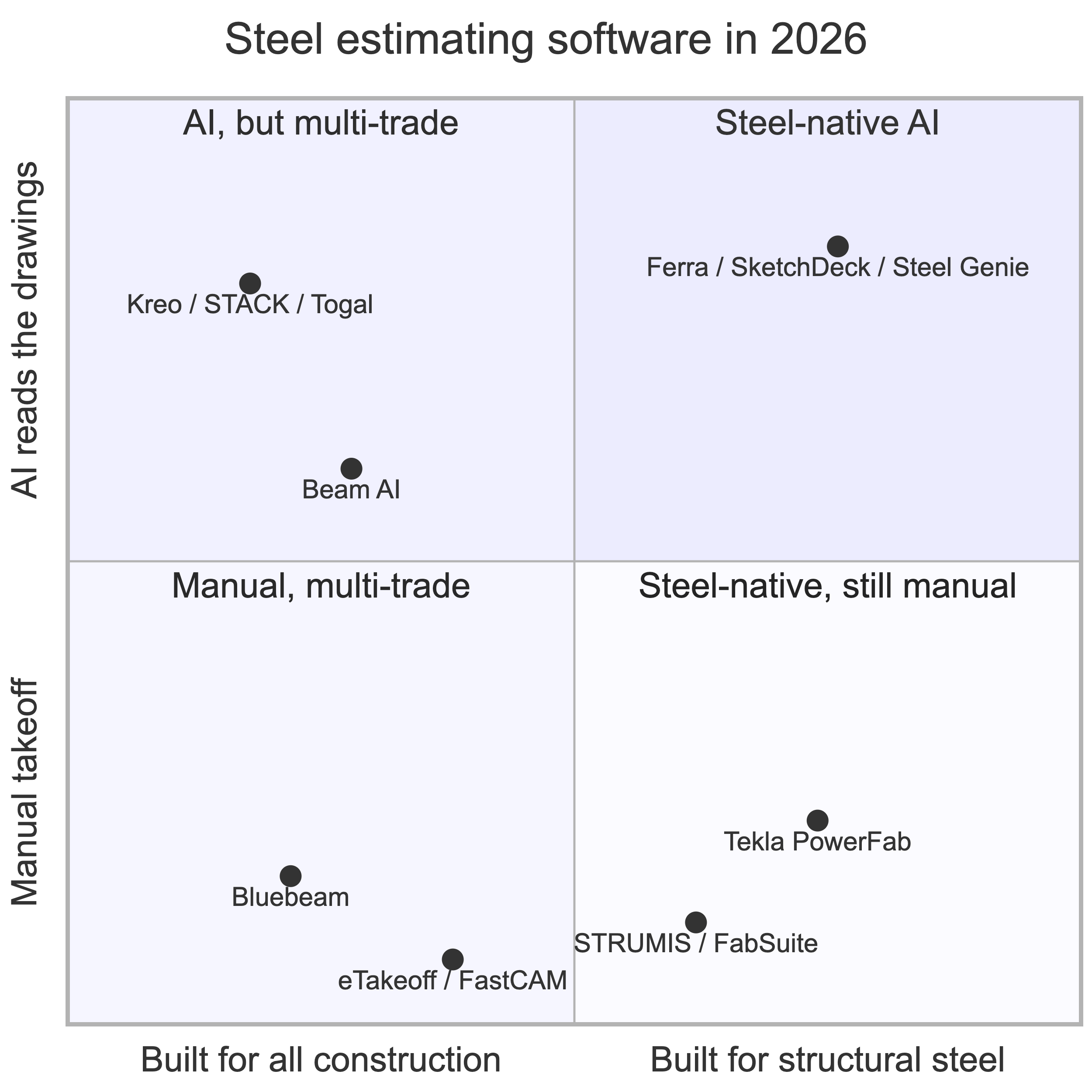
The bottom-right quadrant is the one worth sitting with. Tekla PowerFab and STRUMIS are genuinely built for structural steel, and the takeoff feeding them is still counted by hand.
Other tools you'll come across
A few well-funded AI takeoff platforms show up in steel searches even though they're built for all of construction, not steel specifically. Kreo and STACK both do AI-assisted takeoff across trades and can pull steel quantities from drawings. Togal AI is a funded construction-AI company, strongest on architectural and space takeoffs. You will also run into established digital takeoff tools like eTakeoff and FastCAM, which have steel modules but keep the takeoff manual rather than automating it. They're all capable and worth knowing about. The catch is the same one that runs through this whole comparison: a tool built for all of construction, or one that still counts by hand, tends to miss the steel-specific scope a fabricator actually bids.
How to choose for your shop
Skip the feature checklist and start with two questions.
First, is the tool built for steel or for everyone? A general-contractor takeoff tool pointed at steel will cost you in missed scope, where steel fabrication estimating software is built for the way a fab shop actually works. Second, how does it handle columns and revisions? Those are the two places tools quietly break, so make them the first thing you test, on one of your own projects, not the rehearsed demo file.

If you are deep in SDS2, Steel Genie's integration is worth a look. If you want takeoffs delivered and you work across trades, Beam fits. If your workflow is beam-heavy and you want the most established name, SketchDeck fits. If you want a steel-native AI tool that handles columns, connections, and revisions with the estimator in control, that is the gap we built Ferra to fill. For the underlying mechanics, our guide to structural steel estimating covers how the workflow should actually run.
How to test these tools before you buy
Whatever shortlist you land on, do not judge a tool on its demo file. Test it the way you would trial-hire an estimator: on your own work, under your own conditions.
- Run the same project set through every tool. Pick one real job, ideally a messy one with no column schedule, and put it through each option you are considering. Running the identical set is the only apples-to-apples read you will get, and it surfaces what a rehearsed demo hides.
- Test columns, not beams. Beams are easy. Columns without a schedule are where tools quietly fall apart, so make that the first thing you check.
- Push on revisions. Feed it two versions of a set and see whether it reports what actually changed without double-counting beams.
- Ask about connections. Connections drive shop hours. A tool that counts members and stops there is not pricing your job.
- Watch the verification step. You want the estimator reviewing the output, not trusting it blind. A tool that hides its confidence scores is hiding something.
The point is simple. A tool that looks great on a clean demo and falls over on your own messy set was never going to save you time on the jobs that matter.

Estimating is the only one of the three that happens before you win the work, which is why it is a separate purchase from the other two.
FAQs
What is the best structural steel estimating software in 2026?
It depends on your shop. For a steel-native AI tool that detects beams, columns, joists, braces, and connection types with the estimator reviewing every number, Ferra is the strongest fit for structural steel fabricators. For multi-trade general contractors who want takeoffs delivered, Beam AI fits. For the longest track record in AI steel takeoff, SketchDeck. For shops committed to SDS2, Steel Genie.
What is the best AI takeoff software for steel?
For structural steel specifically, the shortlist is short: SketchDeck, Steel Genie, Ferra, and Beam AI if you want takeoffs delivered rather than run yourself. General AI takeoff software like Kreo, STACK, and Togal AI covers many trades and will pull steel quantities, but it does not model column schedules or connection labor. If most of your work is steel, pick AI steel takeoff software built for the trade.
Is there AI steel takeoff software that actually does columns?
Columns are the hardest part of any structural steel takeoff, especially without a column schedule, and many tools that claim columns handle them poorly. Test it directly: run one of your own projects and check column detection before you believe any other claim. Ferra reads column properties off the schedule, including sections that change by height, with the estimator confirming each value.
What is the difference between Ferra and SketchDeck?
SketchDeck is the longest-established option in AI steel takeoff and is strong on beam takeoff, with seat-based pricing. Ferra is built only for structural steel and covers beams, columns, joists, braces, and connection types with the engineer's design forces, plus revision diffing that avoids double-counting and go or no-go bid intelligence. Ferra uses revenue-based pricing with unlimited users.
Is estimating software the same as structural steel connection design software?
No, and be careful with any vendor blurring the two. Structural steel connection design software sizes and checks connections to AISC 360, and the output carries an engineer's stamp. Estimating software reads the connection design forces the engineer already specified on the drawings, lets the estimator assign physical connection types, and prices the shop hours those types drive. Different job, different liability.
Is steel detailing software the same as estimating software?
No. Structural steel detailing software, like Tekla Structures or SDS2, turns approved design drawings into a 3D model, shop drawings, and CNC data after you have won the job. Estimating and takeoff software works before that, off the engineer's drawings, to produce the bid. Most fabricators outsource detailing rather than buying the software, so if you do not employ detailers, this is probably not the category you need. The full map of steel fabrication software covers where detailing, shop management, and machine control each sit.
How much does structural steel estimating software cost?
Models vary widely. Some tools charge per seat, some per takeoff, and some use a flat or revenue-based subscription. Seat-based pricing can get expensive as your team grows, which is why some shops prefer a model with unlimited users. Always confirm whether users, projects, and pages are capped before you compare prices.
Can AI replace a steel estimator?
No, and be wary of any tool that implies it can. The estimator's judgment is what decides a bid. Good structural steel estimating software automates the counting, sheet-stitching, and revision-diffing, then leaves the number and the call to the estimator. Trust, but verify.
Want to see how Ferra handles your columns, connections, and revisions? Sign up free and run it on one of your own sets, or book a demo and we'll walk it with you.